SafetyIris

Always on site, so you don't have to be.

SafetyIris watches your cameras day and night. When something needs attention, the right person gets a WhatsApp alert with the photo.

Ask for a demo

Nobody has time to watch the footage

Your cameras record thousands of hours a week, and most of it is only seen after something goes wrong. SafetyIris reads the footage for you.

  1. We set it up for your siteWe visit, review your camera positions and choose which check runs on which camera.
  2. It checks while you workThe checks run through the day. The pest and after-hours scans run through the night.
  3. You see what mattersAlerts arrive on WhatsApp with the photo. The dashboard keeps the day's counts and every alert in one place.

What it can do

We choose the checks that suit your site during setup.

Safety and hygiene

Checks that the rules you set are followed on every shift.

Safety and hygiene rules
Flags staff who are not following the rules you set for each area.
Uniforms and protective gear
Checks that staff wear what each area requires.
Hand-wash timing
Times each hand wash, marks the ones that are too short and tracks the gap between washes.
Cross-contamination
Flags a knife used on raw and ready-to-eat food with no wash in between.
Cleaning routines
Confirms that scheduled cleaning actually took place.
Cold-room doors
Alerts you when a cold-room or fridge door is left open with nobody near it.
Phone use
Flags staff spending too long on their phones in work areas.
Smoking
Flags smoking in areas where it is not allowed.
Pests and security

Keeps watching after everyone has gone home.

Pest activity
Scans the night's recordings for pests, and has the clip ready in the morning.
After-hours entry
Finds people moving in closed areas at night, for someone to check.
Restricted areas
Flags anyone entering a space you mark as off limits.

People and customers

Shows how people use your site, with staff left out.

People counts
Counts people through your entrances, hour by hour.
Heat maps
Shows where people spend their time on site.
Queues
Tells you when a line gets too long, so you can open another counter.
Occupancy limits
Alerts you when a room or area gets too full.

Site operations

Catches the everyday problems that nobody reports.

Blocked walkways
Flags a walkway that stays blocked for too long.
Spills and wet floors
Spots a spill early so it can be cleaned before someone slips.
Slips and falls
Alerts your team when someone falls on camera.
Unattended counters
Flags a desk or counter left empty for too long.
Opening and closing
Logs when your site opens, closes and when the first staff arrive.

Your whole site on one screen

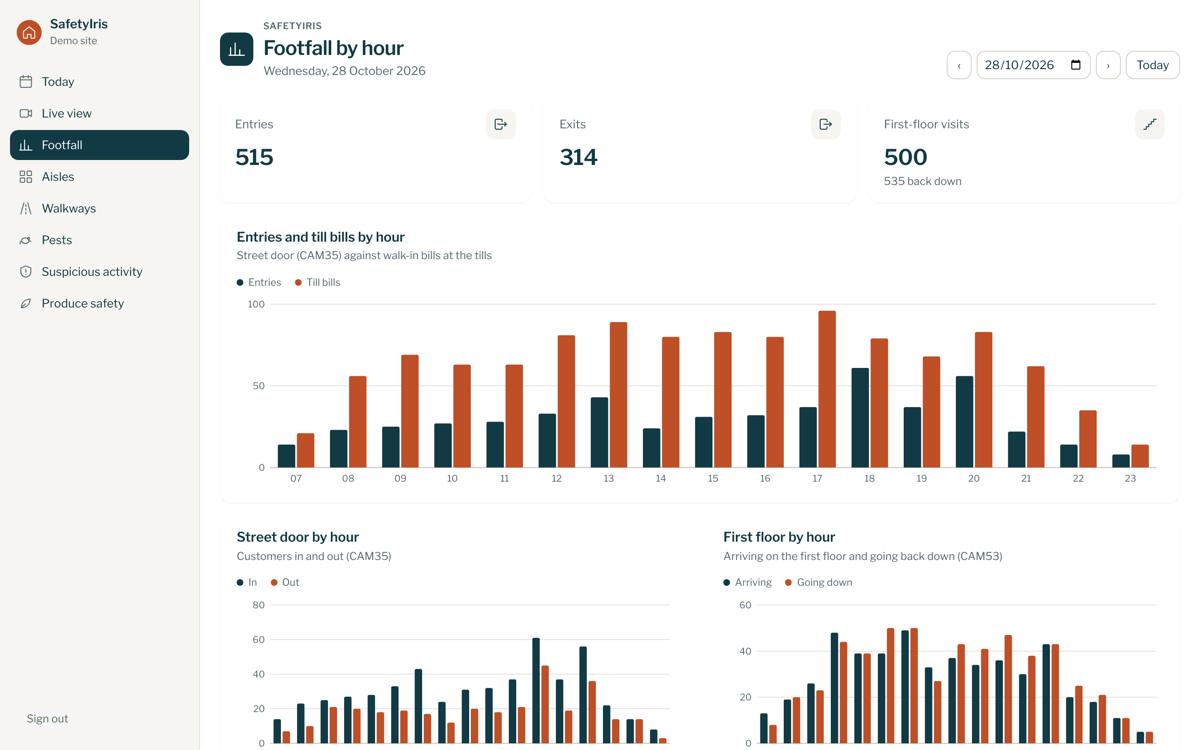
Counts by the hour, the day's alerts and each camera's activity, ready whenever you check in.

The SafetyIris dashboard showing footfall by hour

Built to be checked

We do the tuning. We review the alerts ourselves during training and adjust the system to your site, so nothing is needed from your team.

Footage is never stored. Video is processed only on our side. We keep only the alert photos, which you can see on your dashboard and receive on WhatsApp.

Every alert keeps its evidence. The photo, camera and time stay on the dashboard, so nobody has to search the recordings.

See it on your own site

Tell us about your business and we'll arrange a demo.

[email protected]